Project no longer maintained
The IMatch to Socials project has been superseded by IMatch to Site. The information below is mostly accurate with respect to the final code base on Github, but may require some code inspection for features added in the last days. The repository contains additional code for Mastodon, and the seed for IMatch to Site.
The IMatch to Socials system automates the addition, update and deletion of images between IMatch and flickr or pixelfed. I created it to reduce the time taken updating and managing photos across all three platforms.
Features
- Uses metadata directly from the IMatch database and formats it (to my liking) for sharing with others.
- Processes photos from a dedicated “Socials” category within IMatch and adds any new photos to the matching social platform.
- Updates photos flagged for update.
- Deletes photos flagged for deletion.
- When the target platform is flickr, adds/removes the photo from albums and groups.
- When the target platform is pixelfed, provides alt-text alongside the photo.
- Can be run as an IMatch app for processing without leaving IMatch.
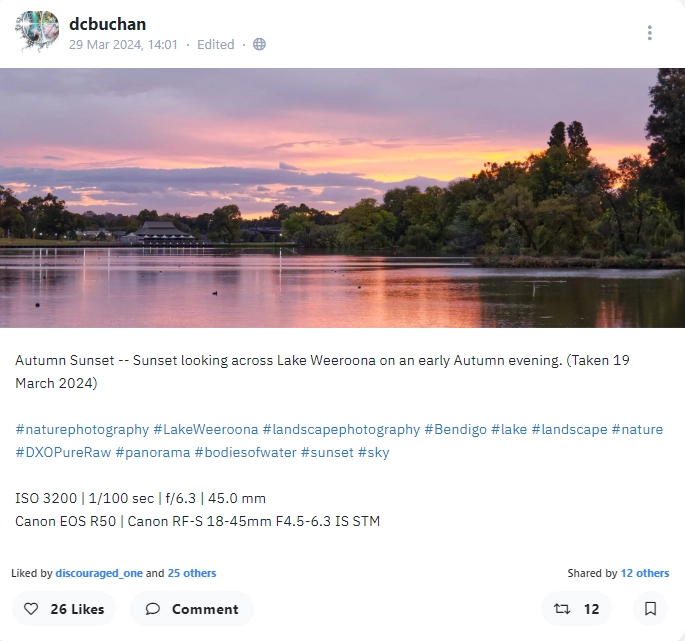
Sample of automatically generated information for Pixelfed
Platform actions
flickr
- Add
- Upload image
- Set title and description (image alt-text added to description)
- Set date taken
- Set keywords
- Add to album(s)
- Add to group(s)
- Update
- Replace image
- Set title and description
- Set date taken
- Add to/remove from albums(s)
- Add to/remove from groups(s)
- Delete
- Delete image (automatic removal from albums and groups)
- Typical error conditions - mean add/update/delete won’t happen
- Missing title or description
- Photo size > 200MB
pixelfed
- Add
- Upload image
- Set title, description and image alt-text
- Update
- Set title, description and image alt-text
- Delete
- Delete image
- Typical error conditions - mean add/update/delete won’t happen
- Missing title, description or headline (for alt-text)
- Photo size > 15MB
Installation and Configuration
Set up Code Environment
For this system to run you need:
- Experience with code. I cannot emphasise this enough. I have taken steps to automate and bullet-proof this system as much as I can and as much as I need for my own purposes. It may not be right for you. The system modifies data and deletes data.
It is your responsibility to test how this system works for you and to support that testing with adequate backups for your needs.
- IMatch from https://www.photools.com (and this means Windows 10 or Windows 11)
- Python at least version 3.10
- For flickr
- Python Flickr API - once you have Python installed run
pip install flickrapi - TZ data for timezone manipulation - once you have python installed run
pip install tzdata
- Python Flickr API - once you have Python installed run
- For pixelfed
- Mastodon.py - once you have Python installed run
pip3 install Mastodon.py - Your own Pixelfed account and ‘personal access token’
- Mastodon.py - once you have Python installed run
- Code downloaded from GitHub - quantumgardener/IMatch-to-Socials
Get Your Application Keys
Create application keys and record the keys and secrets you’re given. These will go into IMatch application variables.
- flickr: The App Garden on Flickr
- pixelfed: Settings | Applications | Create new Token
You do not need to set up both platforms if you are using only the one. However, you will either need to modify share_images.py or call the Python script with a ‘flickr’ or ‘pixelfed’ argument. This is what the IMatch App does.
Create IMatch Application Variables
To remove private information from the code, and to allow for quick changes, the system uses IMatch Application Variables for configuration.

| Variable | Value |
|---|---|
| flickr_api_key | Your personal flickr API key |
| flickr_api_secret | Your personal flickr API secret |
| flickr_is_family | 1 = set, 0 = unset |
| flickr_is_friend | 1 = set, 0 = unset |
| flickr_is_public | 1 = set, 0 = unset |
| flickr_url | URL to your flickr photos without a trailing slash. Mine is https://www.flickr.com/photos/dcbuchan |
| imatch_to_socials_python_script_path | Path to where you have installed the code |
| imatch_to_socials_testing | 1 = test, 0 = live |
| pixelfed_token | Your personal pixelfed app token |
| pixelfed_url | URL of your pixelfed site. Mine is https://pixelfed.au |
| pixelfed_visibility | Pixelfed image visibility (public, unlisted, private, direct) |
There is some configuration in
config.pybut this is more generic.You could move these variables to application variables if you wanted (or vice-versa).
The privacy values effect new images only.
You may want to hide images during testing. You can manually change them in the platform later on if needed, or delete and upload again.
Create IMatch Attributes
IMatch Attributes are a way of attaching non-image metadata to an image within IMatch. They are stored only in the database and never saved to the image file. This system uses them to tag if a photo has been uploaded and provide some information about that.
It does not matter what the information stored is. All that matters is the existence, or not, of an attribute per platform with at least the id of the photo on the target platform.
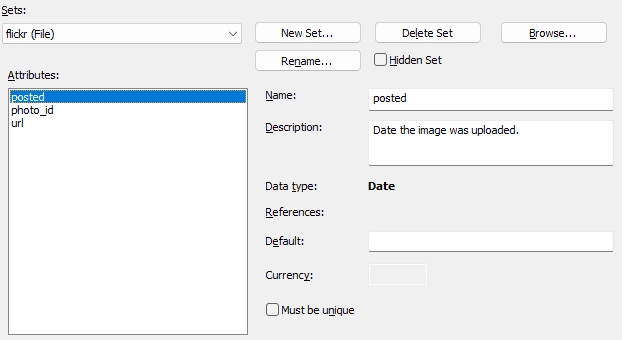
| Set | Name | Type | Must be Unique | Desc. |
|---|---|---|---|---|
| flickr | posted | Date | No | Date the image was uploaded |
| photo_id | Text | Yes | Unique photo id on flickr | |
| url | Hyperlink | Yes | Direct link to photo’s page (created from flickr_url application variable above) | |
| pixelfed | posted | Date | No | Date the image was uploaded |
| media_id | Text | Yes | Unique photo media id on pixelfed | |
| status_id | Text | Yes | Unique text id on pixelfed | |
| url | Hyperlink | Yes | Direct link to photo’s page |
On pixelfed, the “post” that you see is the status. The attached photo is the media.
Manually Deleting
If you delete the attribute record for an image, it will be uploaded on the next run. This could cause duplicates on your platform but is useful when testing.
Create IMatch Categories
The steps are simple. Create a version of an image, and add that image to a category the script recognises and press go. The structure I have is root|platform|actions, errors and filing.
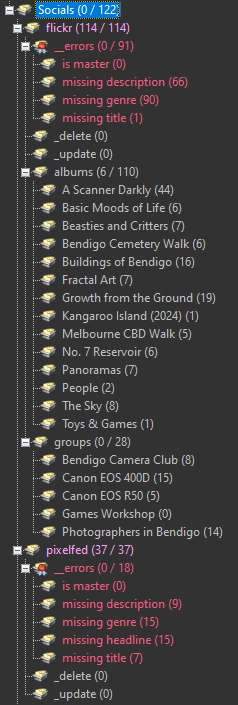
Socialsis defined inconfig.pyasROOT_CATEGORY- The second level categories are the platforms. This must match the name given in the
PlatformControllersubclasses’__init__function and be consistently used. __errorsis defined inconfig.pyand has a sub-category for each error type._deleteand_updateare self-explanatory. Images assigned to these categories are deleted or updated. Defined inconfig.py- An image in both will cause and error. Images are removed from these categories once the action is taken. Therefore:
- For update, an image should be in both the platform and update category
- For delete, an image should only be in the delete category.
- An image in both will cause and error. Images are removed from these categories once the action is taken. Therefore:
- flickr also has
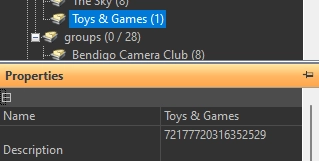
albumsandgroups, These can be named anything, but obviously should match the flickr names. More important is to have the album or group identifier stored in the category’s description. For example, the Toys & Games URL ishttps://www.flickr.com/photos/dcbuchan/albums/72177720316352529/with an ID of72177720316352529. That is shown in the category description.
Tag images for upload
You need a master and a JPEG version for each image. The master holds the metadata and the JPEG version is the image that will be upload.
Tag the master as the image you want to update by adding it to the root of the flickr or pixelfed categories created in the previous step.
The script will find the first JPEG version and upload that, with metadata from the master.
Versions and Metadata
My location hierarchy is quite deep and runs to personal information (see Mediabank). I don’t want flickr to be creating keywords for my home address, but if the information is in the hierarchical keywords field in the uploaded file, it will so location and events information is stored in IMatch categories, outside of the keywords tree. The master image has all the keywords and versions have none.
Configure IMatch App
Advanced topic
This is an advanced topic that relies you understanding what the instructions I give below mean. It’s beyond the scope of this document to explain all the details.
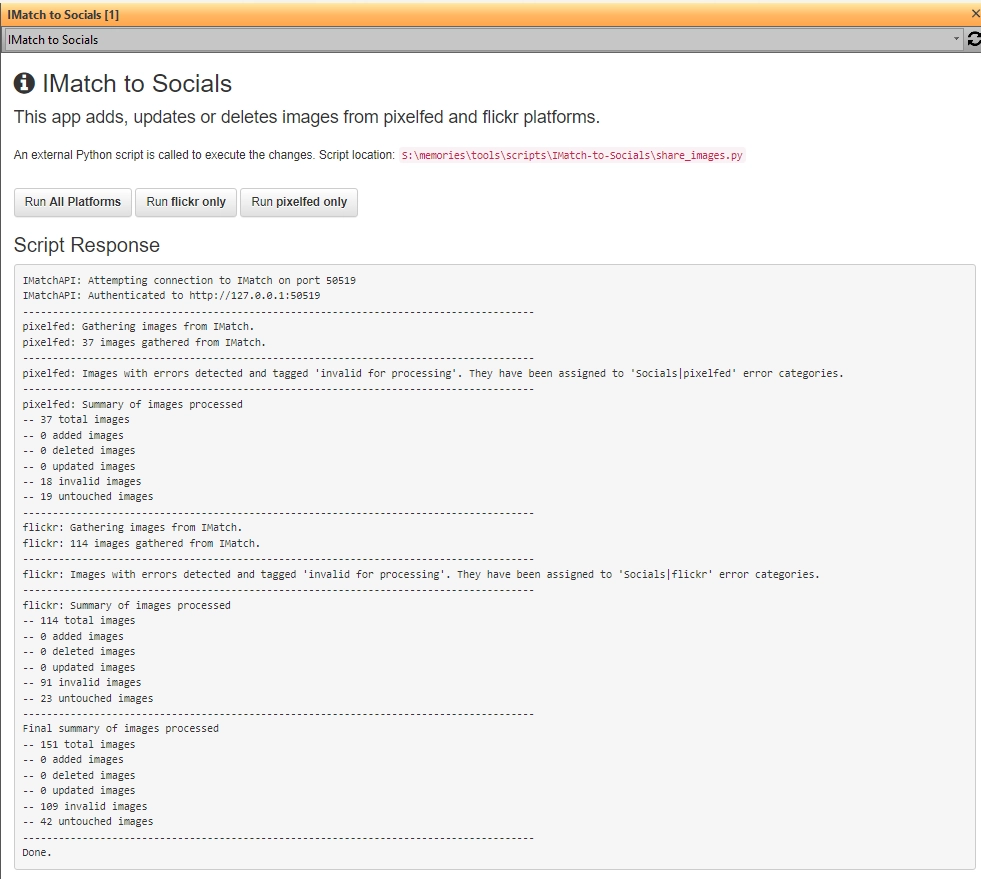
The code can be run from the command line or from with IMatch using an IMatch app. Here’s how I set up mine.
- Close IMatch
- Place the GitHub code in a location of your choice. The
IMatch appfolder is the one we are concerned with. - Create a symlink from the
C:\ProgramData\photools.com\imatch6\webroot\userfolder to the location of yourIMatch Appfolder. - Start IMatch. You should see the application registered.
- Point the
imatch_to_socials_python_script_pathapplication variable to the location whereshare_images.pyis located. - 🤞
Understanding the Code
Main Code Loop (share_images.py)
What does this actually do? The main script share_images.py is a Python script that controls the main processing loop. There is a platform_controller for each platform (flickr, pixelfed). These gather images from IMatch and connect to the respective platforms for the API calls. In the pseudocode below an “image” is all the metadata associated with an image in IMatch.
build platform_controllers
FOR EACH platform_controller
	get images from IMatch with direct membership in Socials|[platform] cateogry
	classify images into add, update, delete, error or no-action categories
	add new images
	update existing images
	delete images
	process errors
END FOR
display processing statistics
Classes
Most of the work is performed by 3 classes, with inherited versions for flickr and pixelfed.
IMatchImage (imatch_image.py)
Manages an images metadata
__init__Pulls and stores common metadata from IMatch such as title, description, keywords and camera information. Traverses from the version in Socials to the master. flickr has a bad habit of creating keywords from personal information in the image file and try as I may, I can’t delete it. In my system I don’t propagate this information to the image version. Instead I use the code to get it from the master.add_keywordformats keywords to remove spaces, replace & etccamera_infomakes some camera information consistent across devices.is_image_in_categorychecks if an image, by it’sid, is in a category or not. Primarily used to check for updates and deletes.is_masterreturns True if this is the master image and so an erroris_on_platformchecks if image has attributes for the platform as this is the marker it it has been previously uploaded. Must be overridden by subclasses.is_validreturns True if the basic validity is met eg. not a master, has a title and description, has genre keywordsis_versionreturns True if this is a version imageprepare_for_uploadfilters and parses keywords and categories, cutting them down to those I am happy to share publicly. Extended by subclasses.shooting_infostandardises the way ISO, shutter speed, aperture etc are displayedwants_deleteis this image in the_deletecategorywants_updateis this image in the_updatecategory
An image in both
_deleteand_updateis flagged as an error and neither action is taken.
FlickrImage (flickr.py)
Extends
IMatchImage
is_validflags an error if the image is > 200MB in size.prepare_for_uploadextends parent class function. Formats text for flickr. Populates the list of albums and groups the image should be in.
PixelfedImage (pixelfed.py)
Extends
IMatchImage
is_validflags an error if the image is > 15MB in size or if the ‘headline’ field is empty since this is used to populate the alt-text once uploaded.prepare_for_uploadextends parent class function. Formats text for pixelfed.
PlatformController (platform_base.py)
Manages a set of images, and the connection to the platform.
add_imagessends each image to the subclass controller to add to the platformclassify_imagesadds images to buckets for add, update, delete and invalid handlingcommit_adddoes the actual add to the platform. Must be overridden by subclasses.commit_deletedoes the actual delete from the platform. Must be overridden by subclasses.commit_updatedoes the actual update on the platform. Must be overridden by subclasses.connectmakes a connection to the platform. Must be overridden by subclasses.delete_imagesrequests deletion for each image from the platform and then removes images from the_deletecategory. If the image is only in this category, it will be gone from Socials.process_errorswalk each subcategory of__errorsand remove all currently assigned images from the last run, then add back all new errored (invalid) imagesregister_imagecreates a connection between anIMatchImageand the controller. Simplifies code.statsis a small utility function to collate processing stats into a dict for easier displaysummarisedisplay a summary of the controllers image counts as assigned byclassify_imagesupdate_imagesdoes an update for each image on the platform.
Relationship between
commit_[action]and[action]_imagesfunctionsThere is strong relationship between each pairing functions. Those beginning with add, delete, and update iterate across the images and make a call to the commit function for each. The looping is common, but the calls to the final platform vary a lot.
The iteration function also test for
config.TESTING. If this is true, the commit function is bypassed.
FlickrController (flickr.py)
Extends
PlatformController
__init__collects privacy variables from IMatch (see Create IMatch Application Variables below) and collects the album and group ids from the description field of the respective IMatch categories.connectconnects to flickr. First run will authenticate via browser.commit_addadds an image to flickr in accordance with the privacy variables set. Adds the image to all albums and groups. Adds keywords as tags. Explicitly sets the date and time from the master metadata. Add attributes for the image so we know it’s been added in the past.commit_deletedeletes the image from flickr. The deletion proceeds without confirmation.commit_updatereplaces the image, updates the description and keywords and syncs album and group membership.
PixelfedController (pixelfed.py)
Extends
PlatformController
connectconnects to pixelfed.commit_addadds an image to pixelfedcommit_deletedeletes the image from pixelfed. The deletion proceeds without confirmation.commit_updateupdates the description and alt-text.
IMatchAPI (IMatchAPI.py)
Python wrapper for the IMatch API
Connects to IMatch which must be running for any of this to work. Contains API wrapper functions for only those functions needed. This is not Python for all of the calls that could be made.
See the code for details of each function. The basic process is to prepare all needed variables within the function, but allow for some to be passed in.
All functions are Python class functions.
IMatchUtility (IMatchAPI.py)
Support functions for
IMatchAPIand other places where needed to do something specific for IMatch
build_categorytakes a list of category path elements and builds a valid category string
import IMatchUtility as iu

category = iu.IMatchUtility.build_category(['Socials','flickr','_delete'])
print(category) # Socials|flickr|_deleteprepare_filelisttakes a single IMatch file id, or array of ids, and turns them into a comma-separated string for passing through to the API.